How to use OnClass
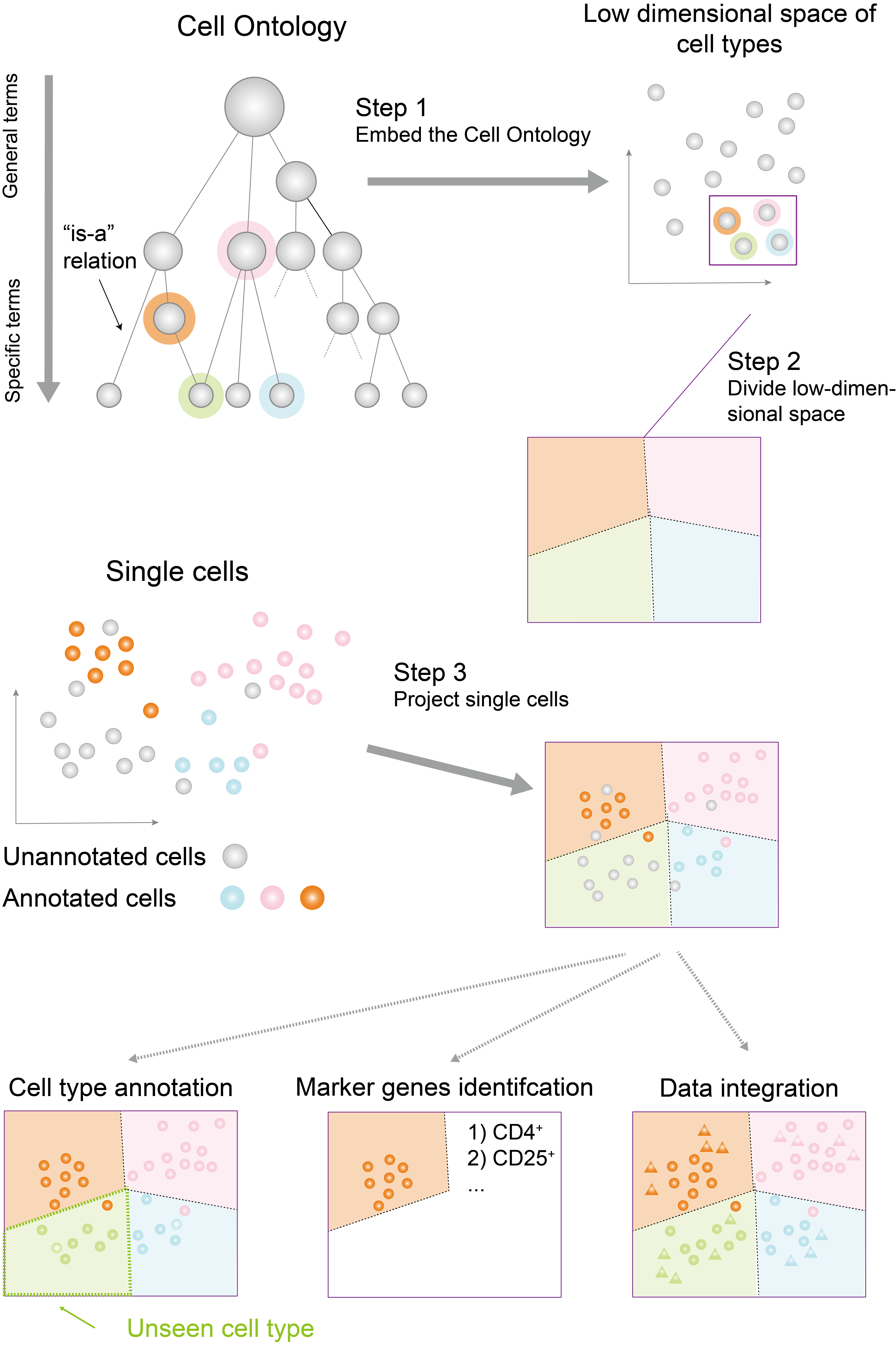
The key idea of OnClass is using the Cell ontology to help cell type prediction. OnClass is the first tool that can classify cells into a new cell type that doesn’t exist in the training data. To achieve this, it has three steps:
1) Embedding Cell ontology
The first step of OnClass is to embed cell types into the low-dimensional space based on the Cell Ontology.
OnClass can take different formats of cell type similarities, including hierarchical structure, directed acyclic graph, weighted network, unweighted network or just a few lines of cell type similarity. An example can be found here .
In our paper, we use the hierarchical ontology structure from the Cell Ontology. However, OnClass is very flexible and can take any forms of prior cell type similarity (i.e., label similarity) can be used. It could be a weighted network, where nodes are cell types and edge weights are cell type similarity (edge weights are not required to be normalized between 0 and 1). It could be an unweighted network where all edge weights are set to 1, which is used in our analysis. It could be just a few lines of cell type similarity, where each line is a tab-spitted three Column file in the form of “CL:000001 CL:000002 0.8”, representing cell type 1, cell type 2, and their similarity. By default, all edges are undirected since they are similarity. But if you have directed similarities, please email us and we are happy to modify the code to support it.
We provide a precomputed cell ontology embeddings based on the Cell Ontology in figshare. Please check the Tutorial section Embedding Cell Ontology for how to read and embed the Cell Ontology.
2) Read the gene expression data
The second step of OnClass is to read the gene expression data with training labels.
The gene expression data is used as training data. It includes a cell by gene matrix and a label for each cell.
The label for each cell should be a cell ontology ID or cell ontology terms. If your training labels are not mapped to cell ontology ID, please use our natural language processing tool to map them to existing cell ontology terms. Our tool use a char-level LSTM siamese network (see Tutorial) and achieve 93.7% accuracy in mapping synonym of cell ontology terms and can deal with composition, misspelling, and abbreviations. For more information about this natural language processing tool, please see section Char-level LSTM for cell type term mapping.
OnClass is a highly flexible tool that can support various formats of gene expression data inputs, including scipy sparse matrix, numpy 2D array, tsv format of matrix, tsv format of “gene_name cell_name count”, scanpy AnnData, and sparse matrix format used by 10X Genomics. Some of these input implementations are adopted from the Scanorama project.
3) Predict cell types for new cells
The last step of OnClass is to predict cell types according to cell type embeddings and gene expression.
OnClass can predict cell types through any of the following four approaches:
- Use the pretrained marker genes. OnClass found 20 marker genes for each cell type in the Cell Ontology. Marker genes are precomputed based on all FACS cells from Tabula Muris Senis.
- Use the predicted score of any existing models and propagate to all cell types in the Cell Ontology.
- Use the pretrained Bilinear Neural Network model. This model is trained on all FACS cells from Tabula Muris Senis and all cell type terms from the Cell Ontology.
- Train from new data. Train a new model on a new gene expression data and predicted on the cell types for a set of new cells.
The time and memory complexity of a) and b) are very small (e.g., less than 1 minute on any personal laptop). The time and memory complexity of c) is moderate (less than 1 minute for 50K cells on GPU and less than 10 minutes for 50K on CPU.) The time and memory complexity of d) is large (about 1 hour for 50k cells on GPU and 4 hour for 50k cells on CPU). However, the expected performance is: d) > c) > b) > a). So please choose one of them according to your application.